
How to Use the Vehicle Database Lookup

The Vehicle Database Lookup tool lets you search our comprehensive Amazon vehicle database, which also includes coverage for European market vehicles. This tool helps you verify vehicle details, check available models, and review specific configurations before linking them to your parts.
Step-by-Step Guide
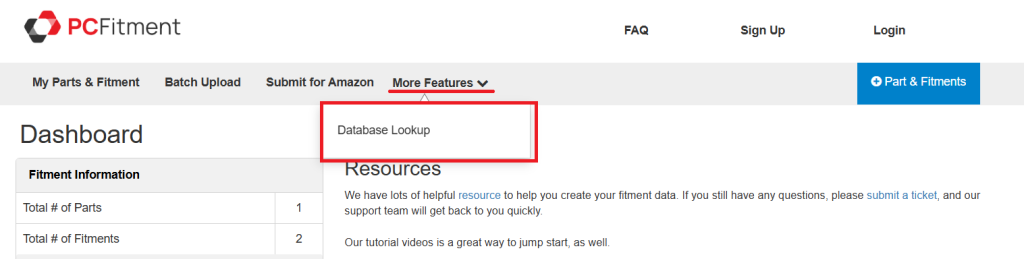
1. Navigate to the Tool
2. Enter Search Criteria
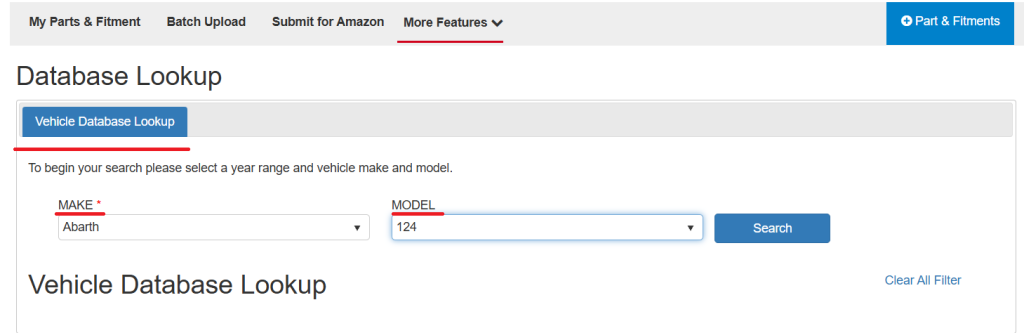
In the Database Lookup form, select the vehicle Make from the dropdown (e.g., Abarth, AC) and enter the Model name (e.g., 124, 428) to begin your search.
After selecting a Make and entering a Model, click the blue Search button to view the results.
3. Review the Results
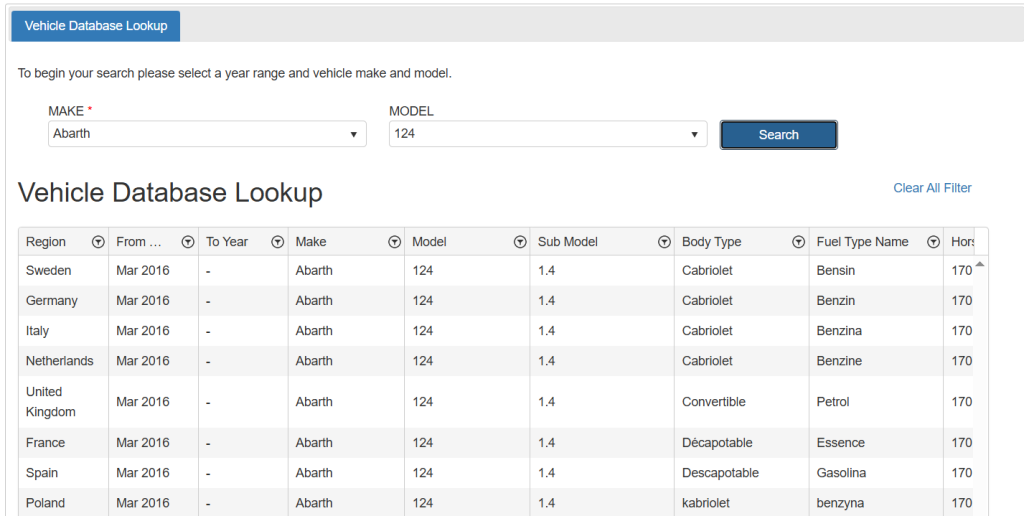
The lookup table will display all matching vehicles with key details such as region (Amazon and European), make, model, year range, body type, and fuel type — helping you confirm the correct vehicle configuration before adding fitment.
Why This Is Helpful
The Vehicle Database Lookup pulls data directly from Amazon’s global vehicle catalog, which already includes European market specifications, ensuring accurate and up-to-date vehicle data within the PCFitment system.