
Overview of the PCFitment Europe Dashboard

Once you log in to your PCFitment Europe account, you’ll land on the Dashboard — your central hub for managing and reviewing all your fitment and part data in one place.
The PCFitment Europe Dashboard is an intuitive, user-friendly interface designed to simplify your data management process.
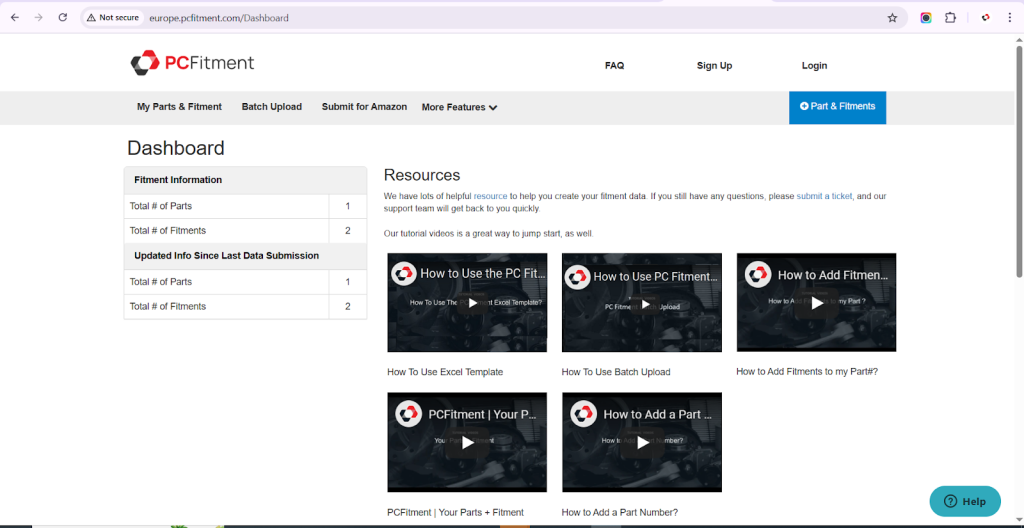
What You’ll Find on the Dashboard
Your Dashboard provides a quick overview of your account activity and essential information, including:
1. Fitment Information Summary
- Total # of Parts – Shows the total number of parts you’ve added to your account.
- Total # of Fitments – Displays how many fitments are linked to those parts.
2. Updated Info Since Last Data Submission
This section helps you track any new or modified data since your last upload, allowing you to keep your catalog current and accurate.
Helpful Resources and Tutorial Videos
On the right-hand side, you’ll find a Resources section with useful links and tutorial videos to help you get started quickly.
These short videos provide step-by-step demonstrations, making it easier to learn how to manage your parts and fitment data efficiently.
If you need more help, you can also submit a support ticket, and our PCFitment Europe team will get back to you promptly.